Showing posts with label RootsMagic. Show all posts

26 November 2014

New RootsMagic 7 COMPARE FILES Feature - My Way!

WOW! I'm impressed! The new version 7 of RootsMagic has added a new "compare files" feature and I found a slick use for it.

I use RootsMagic as my my main family history software. However, I also use FamilyTreeMaker mainly to download my Ancestry tree information. But, the problem has been trying to get the info from my FTM file into my RootsMagic file without having to individually download any documents or events I want to save to my home files. I also didn't want to have to go through every single person and compare my FTM file with my RootsMagic file by having both software packages open and having to retype any differences I find. I've been avoiding it like the plague!

RootsMagic's new feature just saved me hundreds, if not thousands, of hours of tedious work. Here's what I did.

1. I opened and synced my FTM file.

2. I exported a gedcom 5.5 file from my FTM file and gave it a name to remind me where the gedcom file came from.

3. I created a new RootsMagic 7 database with the same name I assigned to the gedcom file. (or any name you want)

4. I imported the gedcom file into the new RM file I had just created.

Now...

5. I opened my main RootsMagic 7 file.

6. Select FILE -- COMPARE FILES and then I selected the new RM file I created from the downloaded FTM gedcom.


During the comparison process you will see the status of the comparison.


Here is what the comparison displays. You can click on the column headers to resort.


As you can see there are little empty boxes displayed to the left of some events. Selecting a box allows you to pass the specific data from one file to the other. And you can EDIT your person from within the Compare File box. So if I find something in my Ancestry tree file (on the right) that I want to add to my RootsMagic tree file (on the left) I can just click the box and RootsMagic will pass the info to my main file.

Also, there are icons under the "S" for Sources (or a camera under the "M" for media). I can click on any of the icons like this check marked one.


When I do, this is what appears.

Now I can copy one or all of my sources found using my Ancestry tree (on the right) directly into my main RootsMagic file! To transfer just some of them click on the individual boxes.

I don't have to complete the entire list on the COMPARE file. If I close the COMPARE file it will eliminate the comparisons that I already worked. Then when I open the file again and do another COMPARE FILES I can just continue with whatever records are listed. Eventually, I can just delete the RootsMagic file that I created from the FTM file.

If you also use FTM, you probably know that when you  sync your file, all the documents and pictures that are attached to your Ancestry tree end up on your computer. They are stored in your "Documents/Family Tree Maker" folder on your computer. 

(I used to copy some of those media files into the same folder where I store my RM media, but that was a real pain, besides taking up valuable space).  Here is what displays on the comparison file if there is media (click on the camera icon). Now all I have to do is copy the media link into my main database and no more copying of those FTM images! RootsMagic now knows where that media file is located and points to it.


Now, you can also receive a copy of a file from a "cousin" or an old database and compare the files and clean up your data. This is a fantastic new feature!! Enjoy!!

NOTE TO LDS MEMBERS: When the final step of the Ancestry/FamilySearch feature is added, you will be able to pass Ancestry sources from your tree into the FamilySearch Family Tree. Then you can download each source directly into your RootsMagic file. 


MyHeritage and RootsMagic Integration - My Experience

With today's announcement of the integration between MyHeritage network and the new release of RootsMagic Version 7, I took the opportunity to test drive the process - and I like it!!

This is a great opportunity for everyone, especially for members of the Church of Jesus Christ of Latter-day Saints who recently were provided access to MyHeritage and it's great Smart-Matching research tools and, for all RootsMagic users around the world.

I have had a family tree(s) on MyHeritage for several years and have found many, many of my ancestors located in other family trees on MyHeritage. As more and more sources are being added (or linked) into MyHeritage I have been letting MyHeritage find the records and sources for me - while I sleep as it searches my tree for matches to other trees and to record set sources!

So many of us in the United States and other countries, including myself, have ancestors from Europe. MyHeritage came into existence in 2003 and began acquiring small genealogy family tree companies throughout Europe. Since then they also acquired Geni.com which includes family trees from around the world. The great benefit I have found is that many of my ancestor's descendants still live in Europe and have created trees (and some are very well documented)! Now, as I link to these trees I am finding "cousins" and their trees that are helping me extent my tree in a fantastic way.

I am also a dedicated user of RootsMagic software. Today's new version 7 provides me a direct link to those "source hints" that are located in both MyHeritage and also in FamilySearch sources.

By selecting the "light bulb" icon next to a person's name as seen here, 


If you don't use FamilySearch LDS features, you won't see the other two icons. You can create a free FamilySearch account and the gray/blue tree icon will display.

you will then see this pop-up.


As I click on the pending "number" of possible sources or matches, the applicable web page opens and displays the source/match. When I confirm or reject them the numbers will change and be added to the confirmed or rejected columns. If I want to save the MyHeritage source to RootsMagic I have to create a source for each fact/event. Yes, it would be great if it automatically saved to my file! But, hopefully, that may be a feature in the future. However, the link to those hints stay in my database behind the little "light bulb" icon on each person in my database.

One thing to keep in mind that is very important....  If the person in your RootsMagic tree is also in MyHeritage or FamilySearch (entered by anyone) then those source hints will display. So you can still compare and match with records in either one. Also, not every data set in FamilySearch is searched by this process, so you will eventually want to search deeper for more sources that the hinting feature does not find. (this paragraph has been edited based on comments below)

So if you have any questions or find something that is incorrect as listed above, post a comment and I will try to answer you.


Joint Announcement Between MyHeritage network and RootsMagic software

Early this morning, an announcement by MyHeritage's network, and RootsMagic software, jointly announced that MyHeritage’s Smart Matching™ and Record Matching technologies have been integrated into RootsMagic’s latest Version 7 of its popular genealogy software (released today). This enables RootsMagic users to discover the life stories of their ancestors thanks to highly accurate matching between their family trees and millions of family trees and billions of global historical records available on MyHeritage. This same technology will take place with the United Kingdom's Family Historian software in mid December.

RootsMagic, first released in 2003, is an award winning genealogy program for documenting and preserving family history. Its latest version 7, released this week, includes among its highlights a new feature named WebHints powered by MyHeritage matching technologies that transforms the program into a powerful research tool. WebHints also include hints from genealogy website FamilySearch for authenticated users. Information sent by RootsMagic to MyHeritage for matching is never collected or shared, and is deleted after matching to ensure the complete privacy of RootsMagic users and their data.
MyHeritage enables millions of families around the world to discover, share and preserve their family history on the MyHeritage website, mobile apps and desktop applications. In addition, MyHeritage is well known as a technology innovator. Its flagship technologies, Smart Matching™ and Record Matching, which generate automatic discoveries based on MyHeritage’s huge international database of family trees and historical records, are sought after within the family history space. Leading genealogy organizations are partnering with MyHeritage to integrate these technologies into their products.
MyHeritage matches are a very exciting feature”, said RootsMagic, Inc.’s Vice President, Michael Booth. “It was like magic to me when the WebHints were first wired into RootsMagic and I opened my file and saw all the matches appear. I spent hours exploring and discovering newspaper articles, certificates, and records that I had never seen before. Our initial testers are also reporting that they have been having so much fun exploring the MyHeritage matches that they have had to pull themselves away to test the other features.”
“We’re thrilled to provide RootsMagic – an acclaimed genealogy software among the most popular in the USA – with our powerful matching technologies” said MyHeritage’s Founder & CEO Gilad Japhet. “This partnership will significantly accelerate discoveries for RootsMagic users and will expand the tremendous reach of MyHeritage.”
About MyHeritage
MyHeritage is the leading destination for discovering, sharing and preserving family history. As technology thought leaders and innovators, MyHeritage is transforming family history into an activity that’s accessible and instantly rewarding. Its global user community enjoys access to a massive database of historical records, the most internationally diverse collection of family trees, and ground-breaking search and matching technologies. MyHeritage is trusted by millions of families and provides them an easy way to share their story, past and present, and treasure it for generations to come. MyHeritage is available in 40 languages.
www.myheritage.com
About RootsMagic, Inc.
For over 20 years, RootsMagic, Inc. has been creating computer software with a special purpose - to unite families. One of its earliest products, the popular Family Origins software, introduced thousands of people to the joy and excitement of family history.
That tradition continues today with RootsMagic, its award-winning genealogy software which makes researching, organizing, and sharing family history fun and easy.
www.rootsmagic.com
_______________
Coming: My experience with the integration...


11 December 2013

RootsMagic Special

Here is a message from our friends at RootsMagic:

Give RootsMagic + Book Together for $20
It's hard to believe this is our 10th year offering holiday pricing for gifts, and to celebrate we are going to do our best holiday offer ever!

During this special holiday sale, you can order gift copies of RootsMagic 6 *AND* the book "Getting the Most Out of RootsMagic" for just $20 (plus shipping).  That's right, both the program and book together for $20.

Even better, you can order our other products for just $19.95 each, or you can order our 3 best sellers (RootsMagic, Personal Historian, Family Atlas, and the RootsMagic book) together for just $49.95.


There is no limit on the number of discounted gift copies you can buy during this limited time offer which will end December 20, 2013. You will receive the full program and 360 page book for each copy you order.

To take advantage of this offer, just visit:

http://www.rootsmagic.com/holidayoffer

or order by phone at 1-80
0-ROOTSMAGIC (1-800-766-8762).  You'll need to mention the code HOLIDAY2013 when you call.

27 June 2013

PAF users have a new home at RootsMagic; Upgrade offer and Free Quick Start guide

If you are a current user of PAF genealogy software take a look at this RootsMagic offer for you. RootsMagic will make your transition as easy as possible and you will find a whole new list of possibilities for your family tree.

Remember that as of July 15th, 2013, PAF will no longer be supported by FamilySearch nor will it be available for download.

So take advantage of this great offer and read all the detail at PAF Users Have a New Home. You will even receive a free quick start guide.

20 March 2013

RootsMagic's RootsTech Contest-Win an iPad!

RootsMagic, the award-winning genealogy software is having a contest in conjunction with the 2013 RootsTech Conference, March 21-24. They are again partnering with 15 of the best and brightest genealogy bloggers (Ha ha, I'm one of them!) who will be reporting at the RootsTech conference. Each  blogger will place one of 15 clue words on their website. (Can you find mine?)

From Thursday, March 21 through Wednesday, March 27, 2013, visit http://www.rootsmagic.com/treasure for a complete list of the blogs where the 15 clue words can be found. Visit each blog, collect all 15 clue words, and you could win software, prizes, or an iPad

Enter at RootsTech or at Home
Once you've collected the clues there are two ways to enter. The first is at the RootsTech conference itself. Pick up an entry card at the RootsMagic booth (#401) in the Exhibit Hall. Write the clue words on the back of the card and return it to the RootsMagic booth in the Exhibit Hall by Saturday, March 23 at 1:20 pm. At that time, they will hold the prize drawings. You must be present to win.

RootsMagic didn't want those who aren't able to attend RootsTech in person to feel left out so they are holding a second drawing and giving away more prizes including a second iPad. To enter this drawing, visit http://www.rootsmagic.com/treasure anytime between Thursday, March 21 and midnight MST on Wednesday, March 27, 2013. Fill out the online form to be entered into the second drawing. You may enter both drawings but one entry per person, per drawing. Winners will be picked at random and notified via e-mail by Friday, March 29, 2013.

Remember, the treasure hunt doesn't begin until this Thursday. Good luck! 

28 March 2012

RootsMagic 5.0.3 Update Released

Just in case you have been hiding out, on a long vacation, or just haven't had a chance to think about it, RootsMagic 5 was released about 4 months ago to include a number of new features. Three main features that I am finding so useful include the following:

Research Manager: No longer do you need to keep track of individual papers and files hanging out in your office or computer. The new Research Manager keeps track of all research logs you create, listing all you have found and all you have not found in your research and links to each person/family in your database. The more I use it the more I love it. I'm starting to get a better handle on my organization.

Timeline View: The new tab displays a full timeline of the person's events and those of his/her parents, siblings, spouses, and children. So I can select my great-grandmother, for instance, and immediately see how old she was on the day each of her children was born, when her husband died, or how old she was when her siblings died and where they died. I have access to my notes on this page and can therefore add notes to a fact that makes the narrative more meaningful and clear.

County Check: Once I got used to this I found I really like this feature. Based on a date that I enter for a fact, the county check tells me if the location I enter existed in the county name I entered and suggests the right one for the time period. So one person may have been born in Salt Lake City, Great Salt Lake, Utah Territory and died in Salt Lake City, Salt Lake, Utah, United States. This works for all places in the United States, Canada, the United Kingdom and Australia. This feature also links to an online historical map with county boundaries included.

Just a few days ago an updated version of RootsMagic (Version 5.0.3) was released with some things I've been waiting for!

Here is a breakdown of MY best-of-the-best "new" features added since version 5 was first released.

5.0.3 - 27 March 2012
  • New: New "Who Was There" list prints all people in a selected place at a selected time
  • New: "Fix Broken Media Links" now lets you select the starting drive and/or folder (This is one of my favorite features! It saves tons of time. Now, if I could only drill down further! )
  • New: Media Gallery now lets you sort media by either file name or caption
  • New: Added options to custom reports to shade alternate records or draw lines between records
  • New: Added "Living" checkbox to "Add Person screen"
  • New: Changed 95 year rule to 110 years in New FamilySearch features

5.0.2 - 25 January 2012
  • New: Added ability to split a place into separate place and place details (on Edit Place screen)
  • New: Added option to print place details in place index

See a detailed listing and images of new features in RootsMagic 5.

See a complete list of all new features and fixes added since version 5 was released.

30 January 2012

Win an iPad Thanks to RootsMagic and Rootstech!


I know you all see plenty of posts on facebook about winning a new iPad but this one is FOR REAL. In conjunction with the week's Rootstech conference, RootsMagic is giving two away!  ... and YES, IT's FREE! You don't even have to be in attendance to win! Just follow the rules as listed below. (Keep scrottling to find the clue!) The following is from our friends at RootsMagic! 


         It’s been a tremendous last few months here at RootsMagic. We’ve been busy with the new releases of Personal Historian 2 and RootsMagic 5. We're also excited to participate in one of the largest genealogy events in North America- RootsTech!


We want to celebrate these momentous events with you, our loyal users! And what better way to celebrate than with a treasure hunt where you could win one of many prizes including an iPad 2!

Online Treasure Hunt

We've partnered with 15 of the best and brightest genealogy bloggers who will be reporting at the RootsTech conference. Each blogger will place one of 15 clue words on their website
From Thursday, February 2 through Wednesday, February 8, 2012, visit http://www.rootsmagic.com/treasure for a complete list of the blogs where the 15 clue words can be found. Visit each blog, collect all 15 clue words, and you could win software, prizes, or an iPad 2!

Enter at RootsTech or at Home

Once you've collected the clues there are two ways to enter. The first is at the RootsTech conference itself. Pick up an entry card at the RootsMagic booth (#224) in the Exhibit Hall. Write the clue words on the back of the card and return it to the RootsMagic booth in the Exhibit Hall by Saturday, February 4 at 1:20 pm. At that time, we will hold the prize drawings. You must be present to win.


We didn't want those who aren't able to attend RootsTech in person to feel left out so we're holding a second drawing and giving away more prizes including a second iPad 2. To enter this drawing, visit http://www.rootsmagic.com/treasure anytime between Thursday, February 2 and midnight MST on Wednesday, February 8, 2012. Fill out the online form to be entered into the second drawing. You may enter both drawings but one entry per person, per drawing. Winners will be picked at random and notified via e-mail by Friday, February 10, 2012.


Remember, the treasure hunt doesn't begin until this Thursday. Good luck!

27 November 2011

RootsMagic Releases New Version 5!!

NEW features! ..Research logs, Timeline View, Media Enhancements, CountyCheck, Database Tools, Source Enhancements, and more!


RootsMagic has announced the release of RootsMagic 5! Some of the most requested features have been added making RootsMagic better than ever -- a timeline view showing a person's events as well as those of their immediate family members, a research manager which lets you create and track unlimited research logs, the ability to filter the people view, as well as enhancements to multimedia, sources, to-do lists, and much more.  There's a little something for everyone.


You can see screen shots and more detail about what's new here. and a webinar is scheduled Tuesday, November 29, 2011 5:00 PM - 6:00 PM MST

29 September 2011

Personal Historian 2 Released by RootsMagic, Inc.

You probably all know that I am really a fan of RootsMagic Genealogy Software and have been since it began. I also really like their Personal Historian Software that helps you to write your own personal story OR write a personal history for anyone -- ancestors, family members, friends, etc. Finally, RootsMagic, Inc. has released a new updated version of Personal Historian and I'm so excited to get going on it! Here is the official press release with all the detail! It's so fun and easy!


Personal Historian 2 Software Released
Latest Version of Personal and Family History Writing Software Now Available to the Public
SPRINGVILLE, Utah. — September 28, 2011 — RootsMagic, Inc. today announced the official release of Personal Historian 2, the latest version of the ground-breaking computer software which helps you write the story of your life and of other individuals.  Personal Historian breaks this seemingly monumental task into small, manageable pieces and then reconstructs it into a complete, publishable document.  With the release comes a free “Essentials” version of the software as well as a discount offer for new users and previous owners of the software.

Bring Life to Your Life Stories

“Many people want to write a personal history about themselves or family members but get lost or overwhelmed,” said Michael Booth, vice-president and lead developer of the software.  “It’s very gratifying to hear people tell us that they are finally able to write their life stories thanks to Personal Historian.”

Personal Historian creates an interactive timeline of a person’s life to keep the stories organized, give context to life events, and to allow users to write stories in any order they wish. When ready, Personal Historian will compile the stories into a finished book complete with table of contents, chapters, pictures, indexes, and more.  The book may then be printed at home, edited in a word processor, published professionally, or shared with friends and family.

New Features

“The new features in Personal Historian 2 have been worth the wait,” said Bruce Buzbee, president. “While we’ve added many new and powerful features, we’ve worked hard to make the software even easier to use than before.”

Personal Historian 2 boasts an impressive list of over 40 features including streamlined step-by-step wizards; expanded timelines and memory trigger questions; easy filtering and searching of stories; management of categories, people, and places; improved outlining and writing analysis; wrapping of text around pictures; fonts and text styles; and more-powerful publishing and output options.

Free “Personal Historian Essentials”

RootsMagic is also releasing a new, free edition of Personal Historian named, “Personal Historian Essentials”.  Personal Historian Essentials contains many core features from the Personal Historian software and the two products are fully-compatible with one another.  “We wanted to give everyone a risk-free option,” said Booth.  “Personal Historian Essentials is perfect for someone who wants to start writing a personal history but doesn’t know where to begin.”  Personal Historian Essentials is available for download at http://www.personalhistorian.com.

Discount Offer

To celebrate it’s release, RootsMagic, Inc. is pleased to offer a special introductory offer for Personal Historian 2. Through October 31, 2011, Personal Historian 2 is available for a special introductory price of only $19.95, saving $10 off of the regular price.  The discount is available only on the Personal Historian website at http://www.personalhistorian.com or by calling 1-800-766-8762.

About RootsMagic, Inc.
For over 20 years, RootsMagic, Inc. has been creating computer software with a special purpose- to unite families. One of our earliest products- the popular “Family Origins” software, introduced thousands of people to the joy and excitement of family history.

That tradition continues today with “RootsMagic”, our award-winning genealogy software which makes researching, organizing, and sharing your family history fun and easy. “Personal Historian” will help you easily write and preserve your life stories. “Family Reunion Organizer” takes the headaches out of planning those important get-togethers. And “Family Atlas” creates beautiful and educational geographic maps of your family history.

For more information, visit www.rootsmagic.com.
Source: RootsMagic, Inc.


12 April 2011

RootsMagic Training Classes Begin Tonight! April 12th

Reminder: The first of five classes for training on the RootsMagic Software program begins tonight at the Riverton FamilySearch Library. I will be teaching each Tuesday evening from 7-9pm from April 12th through the 10th of May. Please come join me! Even if you need to miss a class, no problem! Each class stands by itself. See you there!

05 January 2011

UVPAFUG Meeting/Classes

The next regular, second-Saturday-of-the-month meeting of the Utah Valley PAF (Personal Ancestral File) Users Group will be on Saturday, 8 Jan 2011, from 9 am to noon in the LDS "Red Chapel", 4050 North Timpview Drive (650 East), Provo. 

The main presentation for this meeting will be by
Barbara Renick on EPUBLISHING
Genealogists are motivated to preserve and share what they have found and by publishing they open their work to peer review (critique) which often brings to light possible errors and additional resources. Today there are two approaches to publishing: low or no cost electronic publishing (for part or all of research summaries and family history books) and the use of the Internet to find and manage the best paper publishing options. This presentation will be an extensive discussion of electronic publishing media, including online library catalogs with Web 2.0 user-added-content, different types of Wikis and Web sites, blogs, digitized books online, plus publishing to CDs and DVDs. 
Barbara Renick is a nationally known genealogy lecturer who lectures frequently at national and local genealogy conferences. She currently serves on staff and teaches at the LDS Regional Family History Center in Orange, California. She writes for several genealogy publications and has written several genealogy books, her most recent one being Genealogy 101: How to Trace Your Family's History and Heritage. That book was sponsored by the National Genealogical Society for their 100th Anniversary. 
She is also well known for the 'Z' Links page at her website http://www.zroots.com/ which is a favorite tool for many people. Her maiden name was Zuknick and she was born in Maryland to a German immigrant father and and a Tennessee hillbilly mother. She had a four-year scholarship in electrical engineering with an eye toward designing computers, but ended up graduating from BYU in nursing in 1974. After purchasing her first computer in 1983 she was asked to train and supervise a crew of workers for the Church of Jesus Christ of Latter-day Saints for data entry of the International Genealogical Index and the Ancestral File. She teaches many family history classes, writes many family history articles, and is a frequent alpha and beta tester for software programs and Internet sites.

Following the main presentation there will be several classes about family history and technology with something for everyone at any level of expertise. The teachers and classes presently scheduled for this meeting are as follows: 
  1. Scandinavian Research on the Internet, by Rick Mathews
  2. Fun Ideas for Family History Consultants, by Bret Petersen
  3. Personalized Family History Help, by Claudia Benson & Finn Hansen
  4. Making A List and Checking it Twice, by Barbara Renick
  5. Video of last month's main presentation: Introduction to Waypointing, by Travis Mecham
  6. MAC: Uploading to Ancestry and Creating a Web Site, by Ron Snowden
  7. Ancestral Quest, by Gaylon Findlay & Merlin Kitchen
  8. Family Insight, by Andrea Schnakenburg
  9. Legacy, by Joel Graham
  10. RootsMagic, by Bruce Buzbee.
All meetings of the Users Group are open to the public whether members of the Group or not. The Users Group has the goal of helping individuals use technology to further their family history and there are usually 100-125 attending the monthly meetings on the second Saturdays. 

18 December 2010

RootsMagic Adds FamilySearch Discussions and More

The following is important enough to all my RootsMagic friends out there that I wanted to make sure you heard about the latest updates to the software including "discussions" in new FamilySearch, new LDS Ordinance cards, and the ability to search over billions of online records directly without having to go to the other websites and type in your search. The following is from RootsMagic's latest newsletter.


   RootsMagic 4 becomes First Genealogy Software to Support FamilySearch Discussions
SPRINGVILLE, Utah. — December 14, 2010 — RootsMagic, Inc. announced the immediate availability of an update to their RootsMagic 4 and RootsMagic Essentials genealogy software which is certified by FamilySearch for their new "Discussions" service.  They become the first- and currently the only- software to offer this feature.  The update also adds new FamilySearch features including temple ordinance card tracking, historical record searching, saved logins, sharing of Family Ordinance Requests (FORs), and more.

Discussions Certified
The new FamilySearch system gives RootsMagic users a central platform where they can share their information and work together.  When the new FamilySearch system first became available, one of the principal collaborative tools were "disputes"- the ability to mark a piece of information as incorrect with a basic explanation.  In the latest update to FamilySearch, disputes have been replaced with fully-interactive "discussions".  By joining a discussion about a given person, you can make comments, ask questions, and post answers with others who are also interested in that person.

RootsMagic is the first and only software certified by FamilySearch to offer this feature.  "Discussions are a tremendous step-forward in collaborative research," said Bruce Buzbee, president.  "As more and more people join discussions about their ancestors, the information contained in new FamilySearch will be more complete and hopefully more accurate.  Plus, you'll be surprised how many new cousins you will meet."
New Temple Ordinance Tools


RootsMagic is the first software certified by FamilySearch to reserve and request temple ordinances for deceased ancestors.  The new update adds even more tools to manage and track these ordinances.  "One feature that many of our users have requested is the ability to track temple ordinance cards," said Michael Booth, vice-president.  "RootsMagic can now retrieve a list of all your printed cards from FamilySearch and lets your keep track of to whom you've given each card and their progress as the ordinances are completed."  Added Booth, "I know my mom has been waiting a long time for this feature and will be putting it to good use."
The update also adds other enhancements such as graphically visualizing ordinance cards and the ability to e-mail and share Family Ordinance Requests (FORs) with others.
Search Over 1 Billion Historical Records
With today's launch of the updated FamilySearch website (www.familysearch.org), RootsMagic can now search for your ancestors through over a billion historical records using the integrated WebSearch feature.  Just click on the ancestor's name and RootsMagic will search FamilySearch's collections of censuses, probates, military records, and vital records for possible matches.  Many of the collections include pictures of the original records which are viewable at no charge.
FamilySearch Made Easy
The latest update to RootsMagic adds other new features to make working with FamilySearch even easier.  These features include filtering and narrowing-down groups of people to work with FamilySearch, saving your username and password for automatic sign-in, and several improvements in speed and reliability.  "Our mission is, 'Family History Made Easy', and that is exactly what this is," said Buzbee.  "As FamilySearch evolves, so does RootsMagic to make the process as simple as possible."

Free and Available Now
Discussions and ordinance card tracking are included in RootsMagic Essentials, free genealogy software which includes all of the FamilySearch features.  It is available for download at http://www.rootsmagic.com/essentials.  Current users of RootsMagic 4 and RootsMagic Essentials may update their software for free at http://www.rootsmagic.com/updates.
Users of other genealogy software products will find it easy to experiment with RootsMagic using their own data. RootsMagic can directly import data from PAF, Family Tree Maker (through 2006), Family Origins, and Legacy Family Tree. It can also read data using the popular GEDCOM format.

About RootsMagic, Inc.
For over 20 years, RootsMagic, Inc. has been creating computer software with a special purpose- to unite families.  One of our earliest products- the popular "Family Origins" software, introduced thousands of people to the joy and excitement of family history.
That tradition continues today with "RootsMagic", our award-winning genealogy software which makes researching, organizing, and sharing your family history fun and easy.  "Personal Historian" will help you easily write and preserve your life stories.  "Family Reunion Organizer" takes the headaches out of planning those important get-togethers.  And "Family Atlas" creates beautiful and educational geographic maps of your family history.
For more information, visit http://www.rootsmagic.com.
Source: RootsMagic, Inc.

Need a last minute Christmas gift? The RootsMagic Holiday Special is still available for a few more days until December 22nd. $20 plus shipping for both the RootsMagic software and book, "Getting the Most Out of RootsMagic -4". You can only receive this special discount from this page: Special Discount.  Added note: If you live close to me contact me and I can save you the shipping cost.


18 October 2010

New Series of RootsMagic Classes


Want some help with RootsMagic software? I'll be teaching another five-week series of classes covering all the major features of RootsMagic 4 and try to answer all your questions. The classes begin again every Monday in November from 1 - 3 pm at the Riverton FamilySearch library.


The class typically follows this schedule:
Week 1 - Getting started; setting up database and options, overview of screens; and building the family tree or pedigree.
Week 2 - Using RootsMagic with new FamilySearch; LDS features
Week 3 - Sources and tools
Week 4 - More Tools and Reports
Week 5 - Multimedia, research aids and sharing data

Come join me whether you use RootsMagic 4 or the free version, RootsMagic Essentials! If you can't make it to every class, come to those you want. And there is no need to register as there is plenty of room. The library is a great facility for teaching and learning; large screens, comfortable chairs, good lighting and very easy parking. If you need help or have questions I'll stay after class and help as much as I can.

The library is easy to get to if you live in either the Salt Lake Valley or in Utah county.  Here's the map for location and directions. Basically you follow Bangerter Highway to the 13400 South exit. There is only one multi-story building to the northeast of the intersection. Park in front and come on it!

01 September 2010

FREE Training in Utah and Salt Lake Counties!

So much to learn, so little time! But, I'm trying to make it a little easier by letting you know what training is available in and around these valleys. Check out the calendar at the bottom of this blog.

I have started adding the training classes for the Riverton FamilySearch Library, their Saturday Seminars held every 3rd Saturday each month, the Family History Library in downtown Salt Lake, and the Utah Valley PAF Users Group (UVPAFUG) in Provo held the 2nd Saturday each month (except December).

There is a direct link to their training pages just above the calendar so you can double check me or look for last minute changes. But I'm listing all the classes on one calendar.

If you know of other FREE training available in either county please let me know and I'll add those to the calendar also. As you can see, there is training available almost every day so don't waste one precious minute of your time! Start learning today!

10 August 2010

RootsMagic Classes

I know this is late, however, I am teaching a five-week series on RootsMagic software at the Riverton FamilySearch Library this month. I have completed the classes on the RootsMagic overview and using new FamilySearch features.

The classes are each Monday in August from 1pm to 3pm. Come join us! Next Monday, the 16th I will be covering sources and some of the tool features available in RM4.

Here is the map and directions on how to get to the Riverton FamilySearch Library. Come join me!

26 March 2010

RootsMagic 4 Releases Update with FamilySearch AutoMatch

More great news for those using RootsMagic 4 or RootsMagic Essentials software and, especially for those who interface directly with new FamilySearch.

A new update and enhancement has been released adding a new time-saving feature called AutoMatch. This feature "examines each person in your RootsMagic file, searches the FamilySearch database for the person, and after carefully comparing them, matches them to gether if they are the same; all without requiring user intervention." Now you can start AutoMatch before you head to bed or go out for the evening and when you come back most of your database should be matched!  This feature is included in both RootsMagic 4 and in RootsMagic Essentials, the free version.


In additon to the new AutoMatch feature, this update is required for RootsMagic to continue working with new FamilySearch, probably early next week. So please take a few minutes and update your version. If your news screen has been turned off, remember to click on HELP>Check for Updates.

To see a list of the new items and the "fixes" in this update click here.

29 December 2009

2010 Training at FHC (update).

New training classes will begin at our Tri-Stake FHC in January.

Starting January 11th a new class on using RootsMagic and new FamilySearch will begin. Currently that class is full but, you can contact me (see contact area below) to get on the waiting list or to let me know if you are interested in the next set of classes.

On Tuesday mornings I will teach some basic classes on using new FamilySearch. I want to limit this class to about four people at a time for those who prefer a slower approach to learning the new processes. Please contact me (see contact area below) and let me know if you are interested.

We will also be teaching some fast-track classes on new FamilySearch on Wednesday mornings and evenings beginning in mid January.

Here is an update on the new FamilySearch classes:

The Tri-stake Family History Center is offering more fast track training classes on new familysearch.  The first two week course will be held on Wednesday, January 13th and Wednesday, January 20th in the Primary Room (on the South side of the building) of the Granite South Stake Center (10000 So. 2100 E).  You may choose to attend the classes from either 10-12 am or 7-9 pm on those days. These classes are open to anyone who wants to learn how to use the new FamilySearch program.  Please come and join us!

18 November 2009

RootsMagic Announcement - BIG-BIG-BIG!!

I think everyone knows how much I like RootsMagic Software. I have just always found it to be easy for people to understand, easy to use, and yet extremely powerful with it's variety of features. Today RM announced a free version of RootsMagic for those genealogists out there who still want to use their software package of choice, but also want to access new FamilySearch and share data.

This is a terrific opportunity to try out the program. There is a full trial version as well. So now, you don't have to manually enter data in new FamilySearch and then manually copy the information into your program. USE ROOTSMAGIC Essentials and find out just how easy it really is!

 RootsMagic Releases Free Genealogy and Family Tree Software


RootsMagic Essentials

“RootsMagic Essentials” Brings Free Tools for Family History

SPRINGVILLE, Utah. — November 18, 2009 — RootsMagic, Inc. announced the immediate availability of RootsMagic Essentials, free desktop genealogy software based on their award-winning RootsMagic 4 system.  RootsMagic Essentials contains many core features found in its namesake that allow the public to easily start tracing their family trees.

Essential Features for Everyone

“Many of our users have told us that they have friends and family members who are interested in getting started in family history but aren’t ready to invest in a more comprehensive package like RootsMagic,” said Bruce Buzbee, president.  “RootsMagic Essentials gives them the features they need to start researching and recording their family tree at a price that can’t be beat—free!”
RootsMagic Essentials Screen
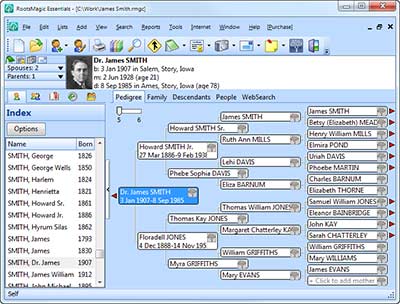
RootsMagic Essentials shares many of the same features with the full RootsMagic software including clean and friendly screens, the ability to add an unlimited number of people and events, pictures and media management, the SourceWizard to write your source citations for you, powerful merging and clean-up tools, dozens of reports and charts, support for international character sets, FamilySearch integration, and the ability to share data with other people and software programs.  The full version of RootsMagic is available for purchase and includes features not available in RootsMagic Essentials.

Free and Available Now

RootsMagic Essentials is available now for free at http://www.rootsmagic.com.  Users of other genealogy software products will find it easy to experiment with RootsMagic Essentials using their own data.  RootsMagic Essentials can directly import data from PAF, Family Tree Maker (through 2006), Family Origins, and Legacy Family Tree.  It can also read and write data using the popular GEDCOM format.
“We’re excited to make RootsMagic Essentials available to the community,” said Michael Booth, vice-president.  “Our mission is to provide ’software to unite families’ and our hope is that RootsMagic Essentials will encourage more people to record their family trees and connect with their family histories”.

About RootsMagic, Inc.

For over 20 years, RootsMagic, Inc. has been creating computer software with a special purpose—to unite families.  One of our earliest products- the popular “Family Origins” software, introduced thousands of people to the joy and excitement of family history.

That tradition continues today with “RootsMagic”, our award-winning genealogy software which makes researching, organizing, and sharing your family history fun and easy.  “Personal Historian” will help you easily write and preserve your life stories.  “Family Reunion Organizer” takes the headaches out of planning those important get-togethers.  And “Family Atlas” creates beautiful and educational geographic maps of your family history.
For more information, visit http://www.rootsmagic.com.
Source: RootsMagic, Inc.

17 July 2009

Draper Temple Accepting FORs


Draper Temple has been accepting FORs (Family Ordinance Requests)for three days now and the process is working fine. For an unknown period of time they will still accept TempleReady disks. However, use a FOR whenever possible, rather than TempleReady if you want to see your completed ordinances online anytime soon.

Ordinance work that is completed by using a FOR to print cards will show on new FamilySearch immediately. Ordinance work that is completed using cards processed using TempleReady WILL NOT SHOW on nFS for up to ten months! Apparently the information has to be hand processed and will take plenty of time to complete.

So what options do you have if you don't have access to nFS yet?

1. Make arrangements to go to your local Family History Center and have a FH Consultant/staff person help you convert your TempleReady data to a FOR. This process can increase the number of duplicate records that have to be combined in nFS, so it is not necessarily the best option.

2. A better method is to use RootsMagic 4, a third party software program certified by FamilySearch (also available at the Family History Center) to create a FOR through nFS. If you don't have access to nFS yet, you will still need a consultant/staff person to login to nFS and sign you in using the helper feature in RootsMagic. RootsMagic will import your family information from your PAF file, or any other software that you currently use.

This process is relatively simple. Import your data into RootsMagic (File>import). Make sure you can see the gray temple icons to the right of each name on the screen. (If not, go up to Tools>File Options and turn on LDS Support and the FamilySearch icon tab and add the check mark.) Just click on the gray icon and sync or add your person to new FamilySearch.

When all your names are synced or added, click on the yellow "caution" icon next to the blue tree (the gray tree turns blue when you are synced) and select "Reserve Ordinances".

Then go to File>FamilySearch>FamilySearch Central. Click on the large Temple Work icon at the top. Select the ordinances you want printed to a FOR and print your FOR.

If you want more detailed instructions on using the nFS features in RootsMagic 4 go to the tutorials located here. (You can always ask questions by contacting me below.)

Reblog this post [with Zemanta]